Was ist ein Balkonkraftwerk?
Ein Balkonkraftwerk ist eine kleine Photovoltaik-Anlage, die auf Balkonen, Terrassen, im Garten oder an der Wand installiert werden kann und dich deinen eigenen Strom produzieren lässt. Das PLUG&PLAY-System bietet einen schnellen und unkomplizierten Einstieg in die eigene Stromversorgung zur Deckung des Strombedarfs in deinem Haushalt. Es ist mobil, flexibel und lässt sich bei einem Umzug einfach mitnehmen. Der Anschluss erfolgt normgerecht und sicher – für den sofortigen Start in die eigene Energiewende.
Wie funktioniert ein Balkonkraftwerk?
Ein Balkonkraftwerk wandelt Sonnenlicht in nutzbaren Haushaltsstrom um. Die Solarmodule erzeugen Gleichstrom, der über einen Mikro-Wechselrichter in Wechselstrom umgewandelt wird. Dieser fließt über einen Schuko-Stecker direkt in dein Hausnetz.
Der erzeugte Strom wird vorrangig im Haushalt verbraucht, was den Netzbezug senkt. Balkonkraftwerke liefern über den Wechselrichter bis zu 800 Watt ins Hausnetz – bei Bedarf auch mit Speicher, um überschüssige Energie zwischenzuspeichern. Die Anlage startet automatisch, sobald Sonnenlicht hinauf scheint.
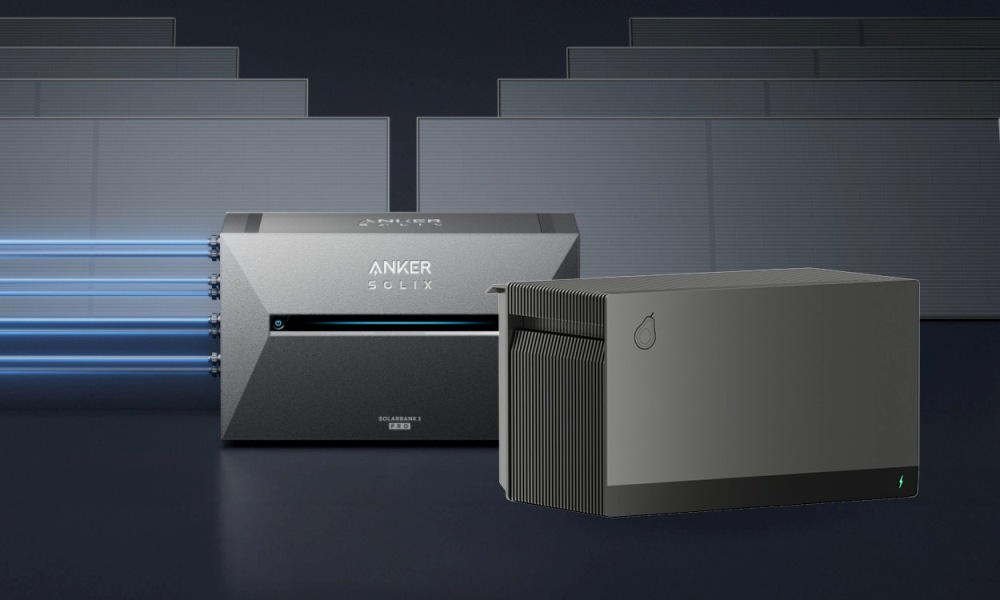
Balkonkraftwerkspeicher Anker SOLIX Solarbank 3 E2700 Pro
Anker SOLIX Solarbank 3 E2700 Pro Batteriespeicher mit 2,68 kWh Speicherkapazität
Schuko-Kabel (3m) ist im Paketinhalt enthalten
4 MPPT-Eingänge für den Anschluss von bis zu 8 Solarmodulen
Integrierte AnkerIntelligence-Software für smartes Energiemanagement
Plug-and-Play-System, erweiterbar auf bis zu 16 kWh Gesamtkapazität
- Solarpanel:
Hochwertige PV-Module zur Stromproduktion – auch bei schwächerer Sonneneinstrahlung oder teilweiser Verschattung. - Wechselrichter:
Kompakt, effizient und für den Betrieb an der Steckdose vorbereitet – wandelt Gleichstrom direkt in nutzbaren Haushaltsstrom um. - Stromspeicher:
Automatische Zwischenspeicherung überschüssiger Energie für die spätere Nutzung – ideal für Abend- und Nachtstunden. - Anschluss- und Verbindungskabel:
Steckerfertige Verbindung aller Komponenten für eine schnelle und sichere Inbetriebnahme. - Montagematerial:
Abgestimmt auf den gewählten Standort (z. B. Balkon, Wand oder Boden) – für eine stabile und dauerhafte Befestigung.
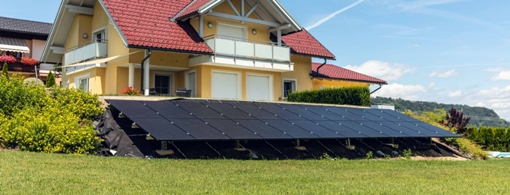
Solarmodul 450Wp black bifazial
1x 450 Wp Solarmodul (bifazial, black) – modernes Design & hohe Effizienz
Maße: 1762 × 1134 × 30mm | Gewicht: 24,5kg
Bifaziale Technologie – nutzt auch rückseitiges Licht für mehr Ertrag
It's easy to get started creating your website. Knowing some of the basics will help.
What is a Content Management System?
A content management system is software that allows you to create and manage webpages easily by separating the creation of your content from the mechanics required to present it on the web.
In this site, the content is stored in a database. The look and feel are created by a template. Joomla! brings together the template and your content to create web pages.
Logging in
To login to your site use the user name and password that were created as part of the installation process. Once logged-in you will be able to create and edit articles and modify some settings.
Creating an article
Once you are logged-in, a new menu will be visible. To create a new article, click on the "Submit Article" link on that menu.
The new article interface gives you a lot of options, but all you need to do is add a title and put something in the content area. To make it easy to find, set the state to published.
Template, site settings, and modules
The look and feel of your site is controlled by a template. You can change the site name, background colour, highlights colour and more by editing the template settings. Click the "Template Settings" in the user menu.
The boxes around the main content of the site are called modules. You can modify modules on the current page by moving your cursor to the module and clicking the edit link. Always be sure to save and close any module you edit.
You can change some site settings such as the site name and description by clicking on the "Site Settings" link.
More advanced options for templates, site settings, modules, and more are available in the site administrator.
Site and Administrator
Your site actually has two separate sites. The site (also called the front end) is what visitors to your site will see. The administrator (also called the back end) is only used by people managing your site. You can access the administrator by clicking the "Site Administrator" link on the "User Menu" menu (visible once you login) or by adding /administrator to the end of your domain name. The same user name and password are used for both sites.
Learn more
There is much more to learn about how to use Joomla! to create the website you envision. You can learn much more at the Joomla! documentation site and on the Joomla! forums.
- Aktuelle Seite:
-
Startseite

- Uncategorised